Creating the Item Master Organization for Office Smart Solutions
What is the Item Master Organization?
It is something that needs to be set up even before the consultants at OSS begin creating the manufacturing organizations and warehouses within OSS.
The item master organization also referred to as the item master should be the first inventory organization to be defined. This organization serves as the central repository for item definitions. Items are entered at the master level and are then assigned to be used in child organizations. This is the sole purpose of the master organization. It has no subinventories and is not used for inventory transactions.
FREE Trial Download!
The Start to End Video Guide to Implementing Oracle Inventory in R12
This version will help you explore and review the COMPLETE Video Tutorial... ALL 87 videos, for 1 Trial and 1 Day.
Once you like the Tutorial, select from any of the Subscription options here, to get your copy of the eLearning Video.
FREE Download
Detailed Course Topics for the Start to End VIDEO Tutorial

As on 12 February 2015...
4,800 Subscriptions

We are TRULY excited to share with you the Feedback we are getting on this Tutorial!


Office Smart Master – The Item Master for OSS
The OSS consultants define an organization and classify it as an Inventory Organization. They named it Office Smart Master or OSM. The steps to defining OSM are no different from the defining of an inventory organization. The only difference is that Office Smart Master is defined as its own item master as seen below. Once that happens, Oracle begins to recognize Office Smart Master as a valid item master for other organizations too. It is only then that this organization appears in the list of values of the Item Master Organization field, when creating a new inventory organization. All other inventory organizations that would be created in OSS will have Office Smart Master as their master organization. We would then call these organizations, child organizations of Office Smart Master.
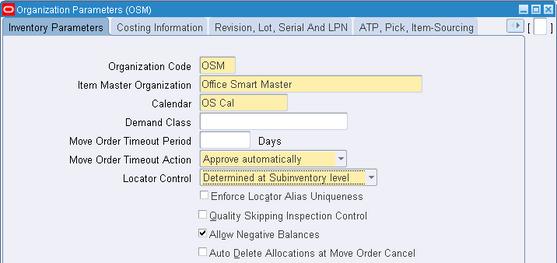
OSM is the organization code or short name given to Office Smart Master. The steps to defining an inventory organization have been demonstrated in the next page.
The Accounting Information for OSM
Office Smart Master may be assigned a Primary Ledger, Legal Entity and Operating Unit which are the same as or different from the ones assigned to the "child organizations". It depends on the organization structure. If for example, an enterprise has its corporate headquarters in the US and had manufacturing plants located in the US, UK and France, then there may be a Primary Ledger, Legal Entity and Operating Unit for each of these geographies. However, the management may choose to have the item master assigned to the Primary Ledger, Legal Entity and Operating Unit in the US.
Since Office Smart Solutions has its manufacturing locations within the US, there would be a common set of Primary Ledger, Legal Entity and Operating Unit as seen below.
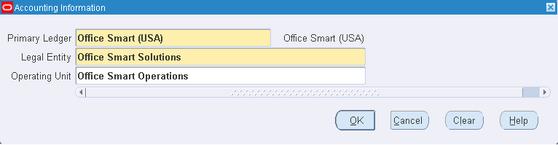
Creation of these entities has been detailed in
Setting Up the Oracle Inventory Organization Structure
Creating the Operating Unit
The OSS consultants now set their sights on creating the first inventory organization for OSS.
FREE DEMO: Creating an Item Master Organization in R12
This is a FREE Download for 30 Days.
The demo runs with full functionality, for 30 Days from the Date of first use.
Therefater, download a new copy of the Demo from the same place.
Click anywhere on the picture below to download the DEMO.
If you have any technical issues with downloading this demo, do email us atmywords@oracle-apps-training-online.com.


Next: Building the Inventory Organization
Previous: Defining the Inventory Organization Calendar
Return to Oracle Inventory from Item Master Organization

Join our Network!
It's FREE!