A New Transaction Type
Travis the Inventory Management track lead at Office Smart Solutions (OSS) has sought Jennifer’s help in designing a new transaction type. The business justification that Travis gave to Jennifer was covered in the previous section.
Jennifer is the Inventory Lead for the R12 implementation project at OSS. Here, we follow her steps one at a time.
FREE Trial Download!
The Start to End Video Guide to Implementing Oracle Inventory in R12
This version will help you explore and review the COMPLETE Video Tutorial... ALL 87 videos, for 1 Trial and 1 Day.
Once you like the Tutorial, select from any of the Subscription options here, to get your copy of the eLearning Video.
FREE Download
Detailed Course Topics for the Start to End VIDEO Tutorial

A New Transaction Source Type
Oracle Inventory comes seeded with a number of Transaction Source Types. These are available under the System tab. Jennifer cannot add a new source type here. But, she can do that under the User tab.
She defines a new source type called MRB Material.
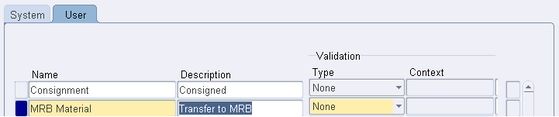
Oracle Inventory makes it possible to validate the source name against a predefined list of values. To make this work, a value set should be defined using the descriptive flexfield context for the Transaction Source Type window. However, Jennifer is not required to go that far and so the Validation Type is left as None.
A New Transaction Type
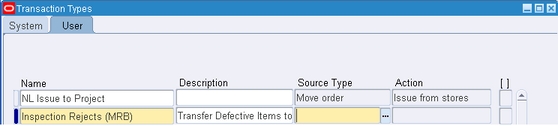
As in the case of Transaction Source Types, so also for Transaction Types Oracle Inventory provides a list of predefined types. These are available under theSystem tab. Jennifer, as in the previous case, takes recourse to the User tab to create a new transaction type. She names it - Inspection Rejects (MRB).
Associating the Transaction Type to the Source Type and Transaction Action
Jennifer looks for the source type she had defined earlier.
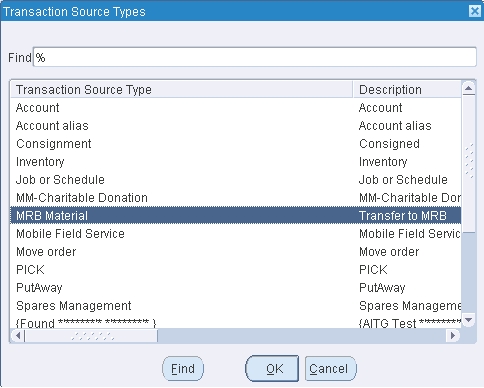
She associates the MRB Material source type to the transaction type. And the, she assigns the transaction action - Subinventory transfer to the transaction type.
Jennifer’s work so far would suffice to meet Travis’s requirement. But the lady goes a step further. She defines a Transaction Reason to be used with the transaction type.
A Note on Transaction Reasons
This is an optional step. A Transaction Reason Code is a tool to classify the reason for performing a transaction. Users can define as many reasons as required. Oracle Inventory provides transaction reporting and inquiring capabilities by transaction reason.
In keeping with the new transaction type she just created, she defines the following transaction reason.

Jennifer would shortly be using this new transaction type in an actual subinventory transfer transaction.
Next: Subinventory Transfer Transactions
Previous: Customizing Transactions in Oracle Inventory
Return to Oracle Inventory from New Transaction Type

Join our Network!
It's FREE!